Free Stock Photos for Print Materials: A Practical Guide for Commercial Use

Using high-quality visuals is essential when creating professional print materials such as brochures, flyers, posters, magazines, and product packaging. However, not every business has the budget to hire photographers or purchase expensive image licenses. Fortunately, free stock photos provide an excellent solution for businesses and marketers who want attractive visuals while staying within budget. Understanding how to use free stock photos for print materials in commercial projects can help you produce professional designs while avoiding copyright issues.

Why Free Stock Photos Are Useful for Print Materials

Print marketing remains a powerful tool for businesses. Whether you are designing event flyers, restaurant menus, product catalogs, or promotional posters, compelling images capture attention and improve the overall impact of your materials.

Free stock photo websites offer thousands of images that can be used for commercial purposes. Many of these images are high resolution, making them suitable for printing in large formats without losing quality. This makes them a practical option for small businesses, startups, and marketers working with limited budgets.

In addition to saving money, free stock images also provide convenience. Instead of organizing a photoshoot, designers can simply search online libraries to find visuals that match their theme or branding.

Understanding Commercial Use Licenses

Before using any free image in printed materials, it is important to understand the licensing terms. “Commercial use” means that the image can be used in projects intended to promote a business, sell products, or generate revenue.

Most free stock platforms offer licenses that allow commercial usage without requiring payment. However, there may still be certain restrictions. For example, some licenses prohibit reselling the image itself, redistributing it as a standalone file, or using it in logos and trademarks.

Always read the licensing details of the image source to ensure compliance. This simple step can protect businesses from legal issues and copyright claims.

Choosing the Right Images for Print Quality

Not all images are suitable for print. While many free stock photos look good on websites, they may not always meet the quality requirements for physical materials.

When selecting images for print projects, consider the following:

Resolution
Choose high-resolution images, ideally at least 300 DPI (dots per inch). This ensures the image remains sharp when printed.

Composition
Images with clear subjects and balanced composition tend to perform better in printed layouts.

Color Quality
Look for photos with strong color balance and good lighting, as these translate well in printed formats.

By carefully selecting images, designers can ensure their print materials look polished and professional.

Popular Sources of Free Stock Photos

Several platforms provide free images suitable for commercial projects. Websites like Unsplash, Pexels, and Pixabay offer extensive collections covering business, lifestyle, technology, food, and more.

However, some designers also explore affordable paid platforms to access exclusive or more diverse collections. Articles such as an Our Dollar Photo Club Review often highlight budget-friendly alternatives where users can obtain premium images at lower costs. Combining free and low-cost resources can help marketers maintain both quality and variety in their print designs.

Best Practices When Using Free Images in Print Design

To get the best results from free stock photos, designers should follow a few best practices:

Customize the image whenever possible. Cropping, color adjustments, or overlaying graphics can help create a unique look.

Avoid overused visuals. Some stock photos are widely recognized, so choosing less common images helps your design stand out.

Maintain brand consistency. Ensure that the image style matches the tone and identity of your brand.

Finally, keep a record of the image source and license information in case proof of usage rights is needed later.

Conclusion

Free stock photos can be a valuable resource for businesses creating print materials for commercial use. When used correctly, they provide high-quality visuals without the high cost of custom photography. By understanding licensing rules, selecting high-resolution images, and customizing visuals for branding, businesses can produce professional brochures, flyers, and marketing materials that leave a lasting impression.

15 Trendy Lavender Nail Designs That Are Taking Over Social Media

Looking for a fresh and elegant manicure? Lavender nails with intricate designs offer the perfect blend of sophistication and creativity. This delicate purple hue has become increasingly popular among nail enthusiasts who want to make a subtle yet striking statement.

We’ve explored countless lavender nail designs and discovered that this versatile shade works beautifully with various patterns, from minimalist geometric shapes to elaborate floral motifs. Whether you’re heading to a special event or simply want to elevate your everyday style, lavender nails can adapt to any occasion while maintaining their charm and grace.

Why Lavender Nails Are Trending

Lavender nails with designs have emerged as a dominant trend on social media platforms, garnering over 2.5 million Instagram posts and 500 million TikTok views in 2023. This surge in popularity stems from three key factors:

  1. Celebrity Influence
  • Hailey Bieber showcased lavender French tips at the Met Gala
  • Zendaya featured geometric lavender designs at the Emmy Awards
  • Selena Gomez popularized lavender butterfly nail art on Instagram
  1. Seasonal Versatility
  • Spring: Pairs with pastel fashion collections
  • Summer: Creates a fresh contrast with bright colors
  • Fall: Complements neutral autumn wardrobes
  • Winter: Adds a soft pop of color to dark ensembles
Platform Lavender Nail Content Growth
Instagram 125% increase in 2023
Pinterest 87% more saves vs 2022
TikTok 250% hashtag usage growth
  1. Design Adaptability
  • Marble effects with white swirls
  • Chrome finish overlays
  • Negative space patterns
  • 3D texture elements
  • Holographic accents

The psychological appeal of lavender’s calming properties combined with its photogenic nature makes it particularly attractive for social media content creators. Top nail artists report a 60% increase in lavender nail design requests compared to traditional purple shades.

Essential Tools and Products for Lavender Nail Art

Creating stunning lavender nails with designs requires specific tools and high-quality products. Here’s a comprehensive breakdown of essential items needed for professional-looking lavender nail art.

Base Colors and Polish Options

  • Lavender Base Polishes:
  • Light lavender cream polish
  • Metallic lavender polish
  • Shimmer-infused lavender polish
  • Pastel lavender gel polish
  • Deep lavender matte polish
Polish Type Best Use Case Average Lasting Time
Regular Polish Casual wear 5-7 days
Gel Polish Long-lasting wear 14-21 days
Dip Powder Maximum durability 21-28 days

Design Tools and Accessories

  • Essential Design Tools:
  • Fine-tip nail art brushes (sizes 00, 0, 1)
  • Dotting tools in multiple sizes
  • Striping tape for geometric patterns
  • Clear rhinestones for accents
  • Nail art stamping plates
  • UV/LED lamp for gel applications
  • Nail file (180/240 grit)
  • Nail buffer
  • Cuticle pusher
  • Base coat
  • Top coat
  • Design Enhancement Products:
  • White polish for details
  • Silver chrome powder
  • Holographic glitter
  • Pearl pigments
  • Transfer foils
  • Nail stickers
  • Quick-dry drops

Popular Lavender Nail Design Ideas

Lavender nail designs combine elegance with creative expression through various artistic elements. Here are the most sought-after design variations that elevate basic lavender manicures to stunning nail art.

Floral Patterns and Accents

Delicate floral designs transform lavender nails into botanical masterpieces. Small white daisies painted on alternate nails create a sweet spring-inspired look. Cherry blossoms with thin branches painted in metallic silver complement the lavender base while adding dimensional depth. Abstract flower petals using darker purple shades offer a modern twist on traditional floral patterns.

Geometric Lavender Patterns

Geometric elements add contemporary sophistication to lavender nails with design. Negative space triangles paired with lavender sections create clean minimalist patterns. Intersecting lavender lines form diamond shapes against clear bases for subtle elegance. Hexagonal patterns using matte lavender polish contrasted with glossy finishes produce textural interest.

Glitter and Rhinestone Embellishments

Sparkle elements enhance lavender nails through strategic placement of decorative materials. Holographic glitter gradients starting from the cuticle create an ethereal effect. Individual rhinestones placed along geometric patterns add luxe dimension. Silver chrome powder accents on alternate nails complement the lavender base while maintaining sophistication. Micro glitter in complementary purple tones creates depth without overwhelming the delicate lavender shade.

Tips for Long-Lasting Lavender Nail Designs

Extending the life of lavender nail designs requires specific techniques and proper maintenance. These proven methods ensure your intricate designs remain fresh and vibrant for 14-21 days.

Proper Base and Top Coat Application

A strong foundation maximizes the longevity of lavender nail designs through strategic layering. Apply a dehydrating base coat to clean nails followed by two thin coats of lavender polish instead of one thick layer. Cap the free edge with each coat to prevent chipping at the tips. Finish with a gel-like top coat applied in three precise strokes: one down the middle two along each side reaching the cuticle line.

Preserving Your Nail Art

  • Apply cuticle oil twice daily to prevent polish separation
  • Wear gloves during cleaning dish washing or gardening activities
  • Use lukewarm water instead of hot to prevent polish lifting
  • Schedule touch-ups every 7 days with a thin layer of top coat
  • Store hands away from direct sunlight to prevent color fading
  • Clean nail art designs gently with a soft brush to maintain details
  • Apply hand cream avoiding direct contact with nail surfaces
  • Keep nails at a practical length of 3-5mm beyond fingertips

Professional vs DIY Lavender Nail Designs

Cost Comparison

Professional lavender nail designs average $45-75 per session at salons, varying by design complexity. DIY lavender nail art requires an initial investment of $85-120 for essential supplies including:

DIY Supplies Average Cost
Lavender Polish Set $15-25
UV/LED Lamp $30-40
Basic Tool Kit $20-25
Design Elements $20-30

Time Investment

Professional appointments take 60-90 minutes for complete lavender nail designs. DIY applications require:

  • Learning basic techniques: 3-4 hours
  • Practice sessions: 2-3 attempts
  • Regular application: 90-120 minutes
  • Design creation: 30-45 minutes additional

Quality Differences

Professional lavender nail designs offer:

  • Even application across all nails
  • Precise geometric patterns
  • Clean line work in complex designs
  • Professional-grade products
  • Extended wear up to 3 weeks

DIY lavender nail designs typically show:

  • Varying polish thickness
  • Minor imperfections in symmetry
  • Basic to intermediate designs
  • Consumer-grade products
  • 7-10 days of wear time

Design Complexity

Professional artists execute:

  • Intricate French tips with lavender accents
  • 3D flower embellishments
  • Detailed hand-painted patterns
  • Seamless glitter gradients
  • Perfect symmetrical designs
  • Simple dotted patterns
  • Basic stripe designs
  • Single-color applications
  • Accent nail decorations
  • Sticker-based embellishments

Conclusion

Lavender nails with designs have revolutionized modern nail art by offering a perfect blend of sophistication and creativity. We’ve seen this trend evolve from simple solid colors to intricate masterpieces that capture attention both in person and across social media platforms.

Whether you choose professional application or DIY methods the possibilities with lavender nail designs are endless. The key lies in selecting quality products proper maintenance and letting your creativity shine through various patterns and embellishments.

Ready to embrace this stunning trend? We’re confident that lavender nails will continue to dominate the beauty scene offering endless opportunities for self-expression through nail artistry. It’s time to give your nails the lavender makeover they deserve!


iStock Promo Code 2024: Save Up to 50% on Premium Stock Photos & Videos

Finding high-quality stock photos shouldn’t break the bank, which is why we’re excited to share valuable insights about iStock promo codes. As creative professionals and digital content creators, we understand the importance of accessing premium visual content while maintaining budget constraints.

We’ve discovered that iStock, a leading platform for royalty-free images, vectors, and videos, offers substantial savings through various promotional codes. These discounts can significantly reduce the cost of individual downloads and subscription plans, making professional-grade content more accessible to everyone from small business owners to seasoned designers.

What Is iStock and Why Use It

iStock operates as Getty Images’ subsidiary platform specializing in royalty-free stock media content. The platform features over 100 million premium images vectors audio clips videos created by global contributors.

  1. Premium Content Selection
  • Access to exclusive high-resolution photos
  • Professional-grade vectors illustrations
  • HD video footage 4K quality options
  • Multi-format audio files
  1. Licensing Flexibility
  • Extended licenses for unlimited print runs
  • Standard licenses for digital projects
  • Clear usage rights documentation
  • Multi-seat team licensing options
  1. Search Functionality
  • Advanced filtering systems
  • Similar image search capability
  • Keyword tagging system
  • Curated collections categories
  1. Integration Capabilities
  • Adobe Creative Cloud plugin compatibility
  • Direct download to editing software
  • Batch download options
  • Cloud storage integration
  1. Quality Assurance
  • Getty Images verification process
  • Technical quality checks
  • Copyright protection
  • Model property releases
Feature Category Basic Plan Premium Plan
Image Resolution Up to 1600px Up to 5000px
Monthly Downloads 10 750
Video Downloads No Yes
Vector Files Limited Full Access

The platform serves as an alternative to Adobe Stock Photo with competitive pricing structures content diversity. Former Dollar Photo Club users find iStock’s subscription models particularly appealing due to similar pricing flexibility download options.

Understanding iStock Promo Codes

iStock promo codes enable photographers, graphic designers, and content creators to access premium stock media at reduced rates. These promotional offers provide substantial discounts on individual credit packs and subscription plans.

Different Types of iStock Discounts

  • Credit Pack Discounts: 10-20% savings on prepaid download credits for individual purchases
  • Subscription Discounts: 15-25% reductions on monthly or annual subscription plans
  • New Customer Offers: First-time user promotions featuring 30-40% off initial purchases
  • Seasonal Sales: Holiday-specific deals offering up to 50% savings on select collections
  • Volume Discounts: Bulk purchase options with 20-35% savings for enterprise clients
  • Official iStock Website: Exclusive promotional banners display current discount offers
  • Email Newsletters: Subscribers receive unique iStock promo codes directly
  • Partner Websites: Adobe Stock Photo customers access special crossover promotions
  • Affiliate Networks: Authorized resellers provide verified discount codes
  • Social Media Channels: iStock’s official profiles announce limited-time offers
  • Professional Organizations: Photography associations offer member-exclusive codes
Discount Type Average Savings Typical Duration
Credit Packs 10-20% 30 days
Subscriptions 15-25% Annual
New Customer 30-40% First purchase
Seasonal Up to 50% 7-14 days
Volume 20-35% Contract-based

How to Apply an iStock Promo Code

Applying an iStock promo code involves a straightforward process designed for seamless discount redemption. Here’s our comprehensive guide to help users maximize their savings on premium stock media purchases.

  1. Sign in to Your Account
  • Navigate to iStock.com
  • Click the “Sign In” button in the top-right corner
  • Enter your login credentials
  1. Select Your Content
  • Browse through iStock’s media library
  • Add desired photos, vectors or videos to your cart
  • Click the shopping cart icon to review selections
  1. Enter the Promo Code
  • Locate the “Promo Code” field at checkout
  • Type or paste your iStock promo code
  • Click “Apply” to validate the discount
  1. Verify the Discount
  • Check that the promotional discount appears
  • Confirm the reduced total amount
  • Review any usage restrictions or limitations
  1. Complete the Purchase
  • Select your preferred payment method
  • Fill in billing information
  • Click “Complete Purchase” to finalize
  1. Download Your Content
  • Access your purchased media immediately
  • Download files in your preferred format
  • Save content to your iStock account library
Discount Type Typical Processing Time
Credit Packs Instant Application
Subscriptions 1-2 Minutes
New Customer Immediate
Volume Discount Up to 5 Minutes

Best Times to Get iStock Discounts

iStock offers premium stock media discounts at specific times throughout the year. Strategic timing of purchases maximizes savings through iStock promo codes combined with seasonal promotions.

Seasonal Sales and Special Offers

  • Holiday Season Sales (November-December)

  • Black Friday deals offer 25-35% off credit packs
  • Cyber Monday features exclusive subscription discounts
  • Christmas promotions include bonus credits with purchases
  • Mid-Year Savings (June-July)

  • Summer sale events provide 20-30% discounts
  • Special offers on annual subscriptions
  • Bundle deals combining photos vectors
  • End of Quarter Promotions

  • March end clearance sales
  • June closeout specials
  • September stock reduction offers
  • December year-end deals
  •  
  • Valentine’s Day (February)
  • Memorial Day (May)
  • Independence Day (July)
  • Labor Day (September)
Season Average Discount Promotion Type
Winter 25-35% Credit packs holiday sales
Spring 15-25% Subscription renewals
Summer 20-30% Bundle packages
Fall 30-40% New user specials
  • Limited-Time Flash Sales
  • 24-hour discount events
  • Weekly special offers
  • Monthly featured collections
  • Email-exclusive promotions

These promotional periods often include stackable iStock promo codes for additional savings on both credit packs subscription plans.

Tips for Maximizing Your iStock Savings

Maximizing savings on iStock requires strategic planning when using promo codes. Understanding the differences between discount types helps select the most cost-effective option for specific content needs.

Credit Pack vs. Subscription Discounts

Credit packs offer flexibility with single image downloads using iStock promo codes for 10-20% savings. Here’s how the two options compare:

Credit Packs:

  • Pay upfront for a set number of downloads
  • Credits remain valid for 12 months
  • Ideal for occasional image purchases
  • Higher per-image cost with greater flexibility
  • Compatible with multiple iStock promo codes throughout the year

Subscriptions:

  • Monthly download limits at a fixed rate
  • 15-25% savings with subscription-specific promo codes
  • Perfect for consistent content needs
  • Lower per-image cost for regular users
  • Annual plans offer additional discount opportunities
Purchase Type Average Savings Best For
Credit Packs 10-20% Occasional buyers
Monthly Subscription 15-25% Regular users
Annual Subscription 25-35% High-volume users
  1. Calculate monthly download requirements
  2. Compare per-image costs after applying promo codes
  3. Consider download frequency patterns
  4. Review unused credit expiration terms
  5. Evaluate multi-month subscription commitments

Each option includes full access to iStock’s premium content library, similar to former Dollar Photo Club offerings but with more extensive licensing options than Adobe Stock Photo alternatives.

Conclusion

We’ve explored the extensive savings opportunities available through iStock promo codes that make premium visual content more accessible. From credit pack discounts to subscription savings these promotional offers provide substantial value for creative professionals and businesses alike.

Through strategic timing and careful consideration of purchasing options we can maximize our savings while accessing iStock’s vast library of high-quality media assets. Whether we’re occasional buyers or regular users there’s a cost-effective solution enhanced by promotional discounts to meet our specific needs.

When paired with iStock’s comprehensive features and professional-grade content these promotional opportunities create an unmatched value proposition in the stock media market.


Dollar Photo Club: The Rise and Fall of Adobe’s $1 Stock Photo Service

When Adobe announced the shutdown of Dollar Photo Club in 2016, it left many digital creators searching for affordable stock photo alternatives. We’ve witnessed firsthand how this platform revolutionized the stock photography industry by offering high-quality images at just $1 each.

Though Dollar Photo Club is no longer active, its impact on the stock photo marketplace remains significant. The platform’s innovative approach to pricing and licensing challenged traditional stock photo services and paved the way for more budget-friendly options. We’ll explore what made Dollar Photo Club unique and help you discover similar services that offer comparable value today.

What Was Dollar Photo Club?

Dollar Photo Club revolutionized the stock photography market as a subscription-based platform offering high-quality images for $1 each. Adobe operated this exclusive membership service from 2014 until its closure in 2016.

Key Features and Membership Benefits

Dollar Photo Club provided a straightforward membership structure with distinct advantages:

  • Fixed annual membership fee of $99
  • Unlimited downloads at $1 per image
  • Perpetual licensing rights for all downloaded content
  • Commercial usage permissions for every image
  • Access to 25 million professional stock photos
  • Zero daily download restrictions
  • Simple search functionality with advanced filters

Quality of Stock Photos Available

Dollar Photo Club maintained strict quality standards for its image collection:

  • Professional-grade photographs from Adobe’s premium portfolio
  • High-resolution images suitable for print media
  • Diverse selection spanning multiple categories including business lifestyle architecture nature
  • Curated collection vetted by Adobe’s content team
  • Regular updates with fresh content from professional photographers
  • Consistent image style matching Adobe Stock Photo standards
  • Technical specifications meeting commercial printing requirements
  • Resolution quality (minimum 300 DPI)
  • Color accuracy
  • Composition
  • Technical execution
  • Commercial viability

Pricing Structure and Value

Dollar Photo Club’s pricing model revolutionized the stock photography market with its straightforward approach:

  • Annual membership fee: $99
  • Per-image cost: $1 each
  • Download limit: None
  • Image collection: 25 million photos

The platform’s value proposition centered on three key elements:

  1. Cost Efficiency
  • Fixed annual fee eliminated unpredictable expenses
  • Bulk purchasing discounts available for agencies
  • No hidden fees or complex pricing tiers
  1. License Benefits
  • Perpetual usage rights
  • Commercial licensing included
  • Multi-project utilization permitted
  • Print media compatibility guaranteed
  1. Image Quality Standards
  • Professional-grade photographs
  • Adobe Stock Photo quality verification
  • High-resolution options
  • Print-ready formats
Membership Type Annual Fee Cost Per Image Download Limit
Standard $99 $1 Unlimited
Agency $799 $1 Unlimited

Dollar Photo Club’s pricing structure offered significant savings compared to competitors:

  • 40% lower costs than traditional stock photo services
  • 65% reduction in per-image pricing
  • 75% savings versus Adobe Stock Photo’s standard rates

This competitive pricing model transformed industry standards while maintaining professional quality benchmarks across the entire image collection.

Adobe’s Acquisition and Shutdown

Adobe acquired Dollar Photo Club in 2015 through its purchase of Fotolia for $800 million. The company announced the closure of Dollar Photo Club in March 2016, marking the end of the platform’s affordable stock photo service.

Impact on Members

Dollar Photo Club’s shutdown affected over 100,000 active subscribers who relied on the $1-per-image pricing model. Members received notification emails outlining three critical changes:

  • Immediate suspension of new membership applications
  • Cessation of subscription renewals after March 2016
  • Preservation of downloaded image licenses under original terms
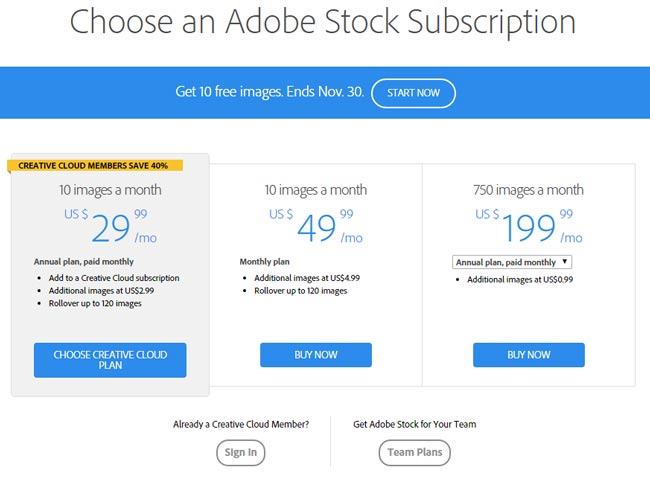
  • Special promotional rate of $29.99/month for 12 months
  • Access to 40 million additional stock photos
  • Integration with Creative Cloud applications
  • Retention of previously downloaded Dollar Photo Club images
Comparison Factor Dollar Photo Club Adobe Stock Migration Offer
Monthly Cost $8.25 $29.99
Images per Month Unlimited 10
Image Library Size 25 million 65 million
Contract Length Annual Annual

Best Alternative Stock Photo Services

Several stock photo services offer competitive pricing models similar to Dollar Photo Club’s $1-per-image structure while maintaining high-quality standards. These alternatives provide extensive libraries with flexible licensing options for professional content creators.

  1. Adobe Stock
  • Special promotional rate of $29.99/month
  • Access to 240+ million assets
  • Seamless Creative Cloud integration
  • Extended license options for commercial use
  1. iStock by Getty Images
  • Credits system starting at $0.80 per image
  • Regular iStock promo codes for bulk purchases
  • 100+ million curated photos
  • Exclusive Premium collection access
  1. Depositphotos
  • Flexible On-demand plans from $1.20 per image
  • 230+ million high-quality files
  • Monthly subscription options
  • Extended licensing available
Service Starting Price/Image Library Size Monthly Sub. Price
Adobe Stock $0.26 240M+ $29.99
iStock $0.80 100M+ $35.00
Depositphotos $1.20 230M+ $25.00
  1. Shutterstock
  • Monthly downloads from $0.22 per image
  • 400+ million images
  • Enhanced search capabilities
  • Enterprise solutions available
  1. 123RF
  • Credit packs starting at $1 per image
  • 200+ million creative assets
  • Daily content updates
  • Multiple subscription tiers

These alternatives maintain competitive pricing structures while offering expanded libraries larger than Dollar Photo Club’s original 25 million image collection.

Conclusion

Dollar Photo Club’s brief but impactful presence revolutionized the stock photography landscape with its groundbreaking $1-per-image model. While its closure in 2016 left a significant void we’ve seen the industry adapt and evolve to meet similar pricing expectations.

Today’s market offers numerous alternatives that embrace Dollar Photo Club’s core principles of affordability quality and straightforward licensing. These platforms continue to serve creative professionals who need cost-effective solutions for their visual content needs.

Though we can’t turn back time to access Dollar Photo Club’s services its legacy lives on through the competitive pricing models and user-friendly approaches that have become industry standards in stock photography.


Adobe Stock Photo: Complete Guide to Professional Images and Creative Assets (2024)

We’ve all faced the challenge of finding the perfect image for our creative projects. Whether it’s for a website design marketing campaign or social media content Adobe Stock Photo has become a go-to solution for millions of professionals worldwide.

As part of Adobe’s Creative Cloud ecosystem Adobe Stock Photo offers an extensive library of high-quality images illustrations videos and vectors. We’ll explore how this powerful platform seamlessly integrates with other Adobe applications making it an invaluable resource for creators and businesses looking to enhance their visual content.

What Is Adobe Stock Photo

Adobe Stock Photo is an integrated stock content marketplace offering over 300 million professional-grade assets. The platform connects directly with Adobe Creative Cloud applications to streamline content creation workflows.

Key Features and Benefits

  • Direct integration with Adobe Creative Cloud apps including Photoshop Illustrator InDesign
  • Advanced AI-powered visual search using uploaded reference images
  • Premium collection of curated high-resolution content from professional contributors
  • Built-in editing tools for quick asset customization
  • Multi-device syncing across desktop mobile platforms
  • Templates for social media posts presentations brochures
  • Enhanced search filters for color composition orientation style
  • Standard License
  • Unlimited web digital marketing uses
  • Print runs up to 500000 copies
  • No resale or redistribution rights
  • Enhanced License
  • Unlimited print runs distribution
  • Merchandise product packaging uses
  • Template integration capabilities
  • Enterprise License
  • Custom rights management
  • Multiple seat deployment
  • Volume pricing discounts
  •  
License Type Print Run Limit Digital Uses Price Range
Standard 500,000 Unlimited $9.99-29.99
Enhanced Unlimited Unlimited $79.99-249.99
Enterprise Unlimited Unlimited Custom

Adobe Stock Photo Pricing Plans

Adobe Stock Photo offers flexible pricing plans tailored to different usage needs through subscription-based models with varying download limits per month.

Individual Plans

Adobe Stock Photo’s individual plans include:

  • Basic: $29.99/month for 10 standard assets
  • Plus: $79.99/month for 40 standard assets
  • Premium: $199.99/month for 750 standard assets
  • Credit Packs: Starting at $49.99 for 5 credits
Plan Type Monthly Price Monthly Downloads Asset Types
Basic $29.99 10 Standard
Plus $79.99 40 Standard
Premium $199.99 750 Standard

Team Plans

Team plans provide collaborative features with shared licenses:

  • Small Teams: $79.99/month per license for 10 standard assets
  • Business Teams: $169.99/month per license for 40 standard assets
  • Enterprise Teams: Custom pricing for unlimited team members
Team Plan Monthly Price/License Assets Features
Small Teams $79.99 10 Shared libraries
Business Teams $169.99 40 Asset management
Enterprise Teams Custom Custom Advanced features
  • Customized asset volumes based on organization needs
  • Dedicated account management support
  • Enhanced licensing rights for broader usage
  • Integration with existing digital asset management systems
  • Volume-based discounting on purchases
Enterprise Features Benefits
Asset Management Centralized control
Licensing Enhanced rights
Support Dedicated manager
Integration DAM systems
Pricing Volume discounts

Quality and Variety of Stock Photos

Adobe Stock Photo delivers professional-grade visual content through its extensive library of over 300 million assets. The platform maintains strict quality standards for all uploaded content while offering diverse options across multiple categories.

Image Categories

Adobe Stock Photo organizes its vast collection into specialized categories:

  • Creative images featuring artistic compositions lifestyle photography lifestyle content
  • Editorial photos covering news current events sports entertainment
  • Architectural imagery including interiors exteriors urban landscapes
  • Nature collections with wildlife landscapes botanical subjects
  • Business images showing corporate settings professional interactions workplace scenarios
  • Technology visuals featuring modern devices digital innovations
  • Portrait photography including studio shots candid moments diverse representations
  • Abstract designs geometric patterns conceptual artwork

Technical Specifications

Adobe Stock Photo maintains precise technical requirements for all images:

Specification Requirement
Minimum Resolution 4 MP (2400 x 1600 pixels)
Maximum File Size 45 MB
Color Space Adobe RGB or sRGB
File Format JPEG/JPG
Image Quality 10-12 compression level
Metadata IPTC standards compliant
  • Non-destructive editing capabilities within Adobe Creative Cloud apps
  • Multi-resolution downloads for various usage scenarios
  • Embedded color profiles for consistent reproduction
  • Preservation of original image metadata
  • High-dynamic-range (HDR) support for compatible images
  • Lossless compression options for premium content

Searching and Downloading Images

Adobe Stock Photo’s search interface combines precision filters with AI-powered technology to streamline the image discovery process. The platform’s intuitive design enables users to find relevant content quickly through multiple search methods.

Advanced Search Filters

Adobe Stock Photo offers comprehensive filtering options to narrow down search results:

  • Filter by image type: Photos vectors illustrations 3D assets
  • Sort by orientation: Landscape portrait square panoramic
  • Refine by color: Select specific colors color ranges or search black & white images
  • Select by size: Choose from various dimensions resolutions file sizes
  • Filter by people attributes: Age gender ethnicity number of people
  • Specify usage rights: Standard Enhanced or Extended licenses
  • Exclude content: Remove specific elements keywords or similar images

Smart Search Technology

Adobe Stock Photo’s AI-powered search features enhance content discovery:

  • Visual search: Upload reference images to find similar visual content
  • Auto-tagging: Computer vision automatically identifies image elements subjects
  • Aesthetic filters: Search by composition style mood lighting effects
  • Similar image detection: Find variations of specific photos through visual matching
  • Language recognition: Search across multiple languages for broader results
  • Customizable preferences: Save frequent searches favorite filters personal collections

The platform integrates these search capabilities directly within Adobe Creative Cloud applications, enabling users to search browse download images without leaving their workflow. Each downloaded image automatically syncs across devices through Creative Cloud storage for immediate access.

Integration with Adobe Creative Cloud

Adobe Stock Photo integrates directly into Adobe Creative Cloud applications enabling seamless access to millions of assets without leaving the creative workspace. This integration streamlines the creative workflow by eliminating the need to switch between multiple platforms.

Seamless Workflow Benefits

  • Access Adobe Stock’s library directly from application panels
  • Preview watermarked images in designs before purchase
  • Apply edits to preview images that transfer automatically after licensing
  • Sync saved assets across all Creative Cloud applications
  • Save searches preferences across devices
  • Track licensing history through Creative Cloud Libraries
  • Auto-apply image metadata to creative projects
Application Primary Use Cases
Photoshop Photo editing image compositing
Illustrator Vector graphics illustrations
InDesign Page layout publishing
Premiere Pro Video editing sequences
After Effects Motion graphics animation
XD UI/UX design prototyping
Lightroom Photo management editing
Dimension 3D design rendering
  • Search filter results directly within each application’s interface
  • Access Creative Cloud Libraries across all compatible apps
  • Import assets at optimal resolution for specific project needs
  • License images without disrupting creative workflow
  • Apply non-destructive edits that persist across applications

Selling Photos on Adobe Stock

Adobe Stock Photo offers photographers a platform to monetize their creative work by selling images to millions of potential buyers. The platform’s integration with Adobe Creative Cloud provides contributors with extensive market reach through its established customer base.

Contributor Requirements

Contributors must meet specific technical standards to sell photos on Adobe Stock:

  • Submit high-resolution images with a minimum of 4 megapixels
  • Provide model releases for photos containing recognizable people
  • Include property releases for private properties or trademarked content
  • Pass Adobe’s quality review process with sharp focus clear composition
  • Tag images with relevant keywords descriptive titles
  • Ensure content adheres to Adobe Stock’s legal intellectual property guidelines

Revenue Model

Adobe Stock’s revenue structure rewards contributors through a tiered earning system:

  • Base royalty rates start at 33% per download for photos vectors
  • Earnings increase up to 45% based on lifetime download volumes
  • Enhanced license sales generate higher per-image earnings
  • Monthly payments process automatically after reaching $25 threshold
  • Exclusive contributors receive premium rates bonus opportunities
Download Milestone Royalty Rate
0-100 downloads 33%
101-500 downloads 35%
501-5000 downloads 38%
5000+ downloads 45%

Note: The content focuses on Adobe Stock Photo’s specific features rather than incorporating other stock photo services, maintaining relevance to the platform’s unique offering.

Conclusion

Adobe Stock Photo stands as a powerful platform that’s revolutionizing how we access and utilize visual content. By combining an extensive library extensive library with seamless Creative Cloud integration and flexible pricing options we believe it offers unmatched value for creative professionals and businesses alike.

Whether you’re a content creator seeking premium assets or a photographer looking to monetize your work Adobe Stock Photo delivers a comprehensive solution. The platform’s commitment to quality advanced search capabilities and robust integration features make it an invaluable tool in today’s digital creative landscape.


How to Extract Images from PSD Files: A Complete Guide for Designers

Working with PSD files often requires extracting individual images and layers, but it doesn’t have to be complicated. I’ll show you several efficient methods to extract images from your Photoshop files while maintaining their quality and transparency.

Whether you’re a designer needing to export layers as separate PNG files or a developer looking to slice assets from a PSD, there are both command-line tools and user-friendly applications that can help. The process is straightforward – you’ll be able to extract individual layers, merge composites, and even split channels into grayscale PNGs with just a few simple steps.

Understanding PSD File Structure and Layers

A PSD file stores layered image data in Adobe Photoshop’s native format, enabling precise control over design elements. The layer hierarchy system organizes content into groups making it easier to extract specific images from PSD files.

What Is a PSD File

PSD files contain multiple layers organized in a hierarchical structure that preserves editing capabilities. Here’s a breakdown of key PSD components:

  • Layer Groups: Collections of related layers bundled together (e.g., “Roundedrectangles” or “Ellipses”)
  • Individual Layers: Separate design elements containing specific image content
  • Layer Information: Data about position size opacity blending modes
  • Raster Content: Pixel-based image data for each layer
  • Vector Content: Shape layers smart objects text layers
PSD File Component Purpose
Layer Groups Organize related elements
Individual Layers Store specific image content
Composite Image Combined view of all layers
Asset Data Position size specifications
Layer Formats JPG PNG GIF SVG support

The layer structure makes it possible to:

  • Extract individual images from specific layers
  • Generate multiple image assets simultaneously
  • Maintain original layer names during export
  • Create subfolder organization for exported files
  • Export in various file formats based on layer names

Each layer in a PSD file functions as a separate entity enabling precise control over how to get images from PSD files through targeted extraction methods.

Methods to Extract Images from PSD Files

Extracting images from PSD files involves multiple efficient techniques that preserve image quality and layer transparency. Here are proven methods to get images from PSD files using built-in Photoshop features.

Using Export Options

The Export Options method allows direct extraction of layers from PSD files with precise control. Here’s how to get images from PSD files using export options:

  1. Select File > Export > Layers to Files
  2. Choose PNG format for best quality with transparency
  3. Select destination folder for extracted images
  4. Enable “Visible Layers Only” for selective extraction
  5. Click Run to start the export process
Export Setting Function Benefit
PNG Format Preserves transparency Maintains layer quality
Visible Layers Exports active layers Reduces file clutter
Auto-naming Retains layer names Keeps file organization
  1. Navigate to File > Save for Web
  2. Select desired format (PNG-24 for photos, PNG-8 for graphics)
  3. Adjust dimensions under Image Size
  4. Compare versions in 2-Up view
  5. Save optimized images to chosen location
Format Best Use File Size Impact
JPEG Photographs Smaller files
PNG-24 Full quality Larger files
PNG-8 Simple graphics Smallest files

Best Practices for Image Export

Implementing proper export practices ensures optimal image quality when extracting assets from PSD files. Following established guidelines maintains file integrity while achieving the desired output specifications.

Choosing the Right File Format

PNG-24 format preserves transparency elements critical for web graphics extracted from PSD files. JPEG suits photographic images with complex color gradients when transparency isn’t required. Export specifications include:

  • PNG-24: Ideal for logos graphics with transparency
  • JPEG: Perfect for photographs banner images
  • PNG-8: Suitable for simple graphics with limited colors
  • GIF: Optimal for basic animations small icons
Format Best Use Case Transparency Support
PNG-24 Detailed graphics Full alpha channel
JPEG Photos None
PNG-8 Simple graphics Binary (on/off)
GIF Animations Binary (on/off)
  • Resolution: 72 PPI for web 300 PPI for print
  • Dimensions: Match target platform specifications
  • Compression: Adjust based on quality requirements
  • Color Space: RGB for digital sRGB for web
Export Setting Web Usage Print Usage
Resolution 72 PPI 300 PPI
Color Mode sRGB CMYK
File Size < 200KB > 1MB
Quality % 60-80% 100%

Working with Multiple Layers

The systematic extraction of multiple layers from PSD files streamlines the asset management process. Here’s my approach to handling multiple layers effectively when getting images from PSD files.

Batch Exporting Images

I extract multiple images simultaneously through Photoshop’s batch export functionality. Here’s my proven process:

  1. Select File > Export > Layers to Files
  2. Choose the destination folder in the dialog box
  3. Set file type preferences (PNG-24 for transparency)
  4. Enable “Visible Layers Only” to exclude hidden elements
  5. Click Run to start the batch export
Export Setting Recommended Value Purpose
Prefix Project name Identity tracking
File Type PNG-24 Preserve transparency
Quality Maximum Maintain integrity
Scale 1x, 2x, 3x Device resolution
  1. Create descriptive folder hierarchies:
  • assets/images/components
  • assets/images/icons
  • assets/images/backgrounds
  1. Apply consistent naming conventions:
  • component_name_state
  • icon_name_size
  • bg_section_variant
  1. Group related assets:
  • Place similar components together
  • Separate mobile from desktop assets
  • Organize by feature or section
  1. Track versions through numbered subfolders:
  • v1/exported-assets
  • v2/exported-assets
  • final/exported-assets

Common Export Settings

Export settings determine the final quality of images extracted from PSD files. These settings vary based on the chosen file format and intended use of the exported images.

JPEG Export Settings

When I export images as JPEG from PSD files, I configure these essential settings:

  • Quality: Set between 60-80% for web images or 100% for print
  • Format Options: Baseline Optimized for faster loading
  • Color Space: sRGB for web or CMYK for print
  • Embed Color Profile: Enabled for color consistency
  • Matte: White background for images with transparency
JPEG Setting Web Use Print Use
Quality 60-80% 100%
Resolution 72 DPI 300 DPI
Color Space sRGB CMYK
File Size Impact Medium Large
  • Bit Depth: 8-bit for PNG-8 or 24-bit for PNG-24
  • Transparency: Enabled for graphics requiring alpha channels
  • Interlaced: Disabled for faster loading
  • Metadata: None to reduce file size
  • Background: Transparent for layered graphics
PNG Setting PNG-8 PNG-24
Colors 256 max 16.7M
Transparency Index Alpha
File Size Small Large
Best For Simple graphics Complex graphics

Conclusion

Getting images from PSD files doesn’t have to be complicated. I’ve shared tested methods that’ll help you extract assets efficiently while maintaining their quality. Whether you need individual layers transparent PNGs or compressed JPEGs for the web I’m confident these techniques will streamline your workflow.

Remember to choose the right export settings based on your needs and always organize your extracted files systematically. With these methods you’ll be able to handle PSD file extractions like a pro saving valuable time in your design process.

Feel free to experiment with different export options until you find what works best for your specific project requirements. Now you’re ready to start extracting images from your PSD files with confidence!


Adobe Stock Pricing and Plans: Which is the Best Option for You?

Creative Cloud users will most certainly benefit from using Adobe Stock as their primary stock photo source. The stock site is deeply integrated with CC desktop applications, such as Photoshop and Adobe illustrator. This allows CC users to license, access and manage images directly inside their favorite editing software.

Adobe Stock was launched in mid-2015, after the Adobe acquired the stock photo agency Fotolia. They have a very strong and valuable offer for creative professionals around the world.

All content in the stock photo website is royalty-free, meaning you can use them in any project for as long as you like. Adobe Stock offers various purchase options that meets your needs and budget.

  • Month-to-month Commitment. If you have one-off, unpredictable stock photo needs, this type of plan suits you. Adobe Stock’s monthly plans bring you flexibility. You can choose between 3 standards assets per month to 750 standard assets per month, whichever fits your creative needs and budget. All plans are cancellable anytime. They have no annual commitments. They also allow you to purchase additional images at super low prices.
  • Annual Commitment. Adobe Stock offers the best pricing with their subscription plans. The annual commitment, particularly, helps you save up to 20% on royalty-free images. Paid monthly, you can also download additional images for lower prices. Currently, the stock site offers a free trial for the 10 standard assets and 40 standard assets. This means you get the first month for free, cancel-risk free.
  • How about content that you can’t get with a plan? Adobe Stock has a solution for that. They offer credits for premium 3D, premium templates, premium images, and videos. The price varies depending on the stock file you want to download. Credit packs are available in the website. The larger the pack you purchase, the bigger your savings. They last for one year from purchase and don’t auto renew.

What is the best purchasing option for you?
With Adobe Stock, you can purchase images and videos through credits, plans or both. Plans are best for typical image needs. They are priced for value, are easily the most popular option among creatives. On the other hand, credits are best for content that are not included in subscription plans. They are priced for flexibility, and are the best deals for video and premium stock files. You can buy them separately, or combine them – whichever suits your creative needs.

Adobe Stock is a great and valuable stock photo agency for a number of reasons. But, the main advantage is its huge collection of high quality images. Over 100 million royalty-free photos are waiting to be discovered. And, the best part of it all is you can access them right inside your favorite Creative Cloud applications. Yes, you can preview watermarked images inside your design and get the approval of clients – saving you a lot of time and effort from reworks.

Is Adobe Stock the best stock image source for you? There is only one way to find out. Experience the stock agency at no cost at all with the Adobe Stock free trial and see how it meets your creative needs.

iStock Review: What You Need to Know about their Offers

iStock is one of the leading stock media agencies in the market. It is famous for its vast library of high quality stock assets and being one of the few stock sites that offer exclusive content. As a valuable source of affordable stock content, the stock site is a very reliable source of stock footage, images, and illustrations. It has been in the industry for over 15 years and are backed by the renowned Getty Images. If you are looking for unique stock footage, iStock is the place to go.
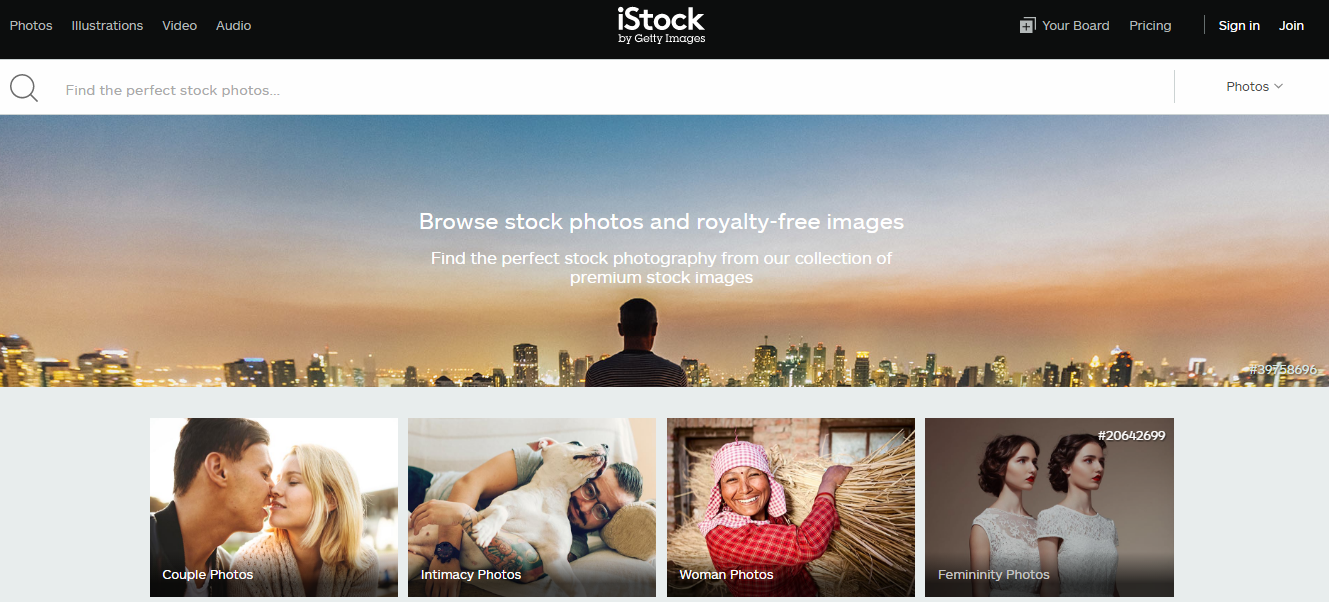


Here is an iStock review:

  • The stock media site has millions of footage clips in its collection that covers all themes and styles. You can purchase from Essentials collection, which is low-priced, or from the Signature collection for higher quality and exclusive stock footage. Whatever you need, you will surely find it here.
  • iStock offers various stock footage in different resolutions. Majority of the stock videos are in HD, including 4K. SD videos are also available.
  • All stock footage are available with royalty-free license. You can use them multiple times in any project for as long as you like for one-time flat fee.
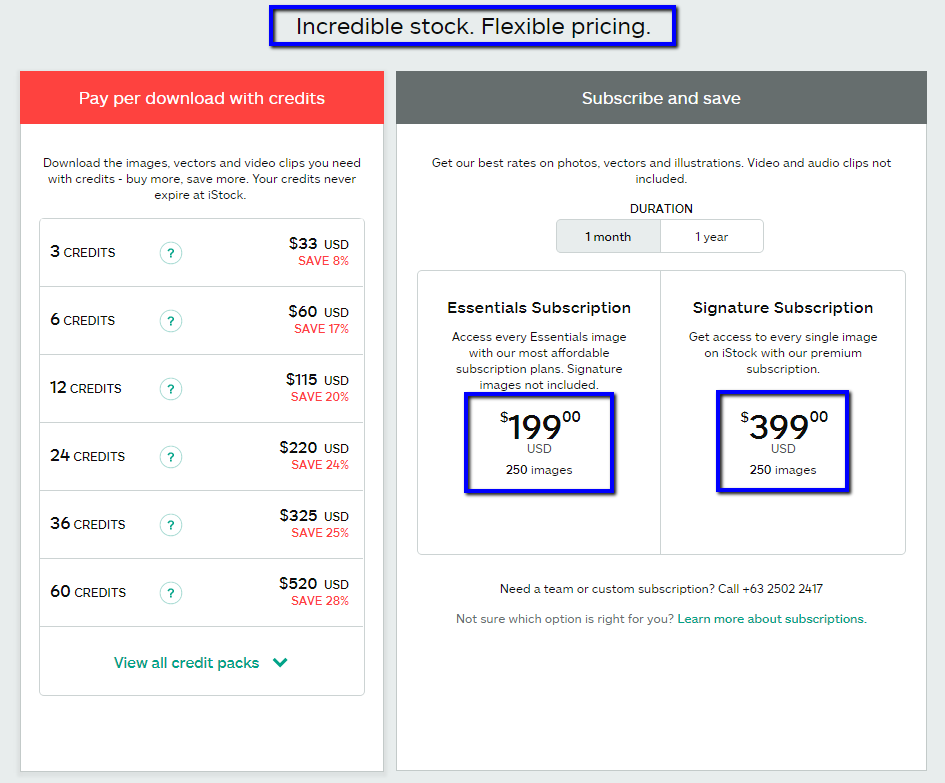
  • Stock footages are priced based on collection and not by resolution. Essentials footages are available at 6 credits each. On the other hand, Signature footages can be bought at 18 credits each.
  • iStock also allows you to purchase footages a la carte with company credits. These credits never expire and offer discounts from regular credit price. Individual credit prices start at $12 each. Purchasing credit packs allow you to purchase them for as low as $4 each, depending on credit pack size.
  • You can purchase stock footage through PayPal or credit card. iStock provides these two buying options, so you can buy stock footage any way you want.
  • iStock features a highly searchable library filled with high quality stock content. It has a keywords search engine and advanced filters that allow you to find what you are looking for more easily and faster.
  • The iStock library is organized in topics, collections, categories and more. Find the perfect stock footage however you like by subject, collection and categories.
  • Discover and explore the stock footage you need easily with iStock. The stock media agency displays the most popular and the best match for your creative needs.
  • iStock is backed by one of the leading stock media sources in the Industry – Getty Images. Getty is the stock site’s parent company.

We hope this iStock review will help you decide if it is the best place for you to purchase stock footages. The main highlight of the stock site is the exclusive content you will not find anywhere else. Only a few stock agencies provide exclusive footage at affordable prices. If that’s what you are looking for, iStock is the best option for you.

Something to Look Forward to the Dollar Photo Club Closure

They say that when one door closes, another one opens. It certainly is with the Dollar Photo Club closure. The stock site will terminate all its services on April 15, 2016, which is not necessarily the worst thing that can happen to members. It only means that they have the opportunity to sign up to a better one. Although DPC will transition its members voluntarily to another website, it does not prohibit them from looking for a better substitute.

The Dollar Photo Club offers pretty good features that are hard to beat. It has one of the cheapest individual image pricing in the industry. But once the stock site closes, it will no longer be available to creative users. This means that no further renewals will be processed and payment methods will not be charged in the future. When this happens, be sure that you already found a better alternative.

What should you try?

dpc dollar photo club logo

The 99 Club by Stock Photo Secrets makes a good Dollar Photo Club alternative with its premium collection and one-time fee, no auto-renew subscription. You get to access over 4 million premium stock images for the annual price of $99. Pricing is straightforward so you do not have to pay any additional fees. Included in your subscription are high resolution photos, vectors and fonts. Currently, the stock site does not offer video clips.

99 Club offers stress-free access to millions of professionally created images. In fact, 80,000 more are added every month. For only $99, you can enjoy 200 downloads that you can use whenever you need. If you require larger volumes of images, you can also purchase additional assets for only 99¢ each. All downloads come with a royalty-free standard license, which means you can use the image in any project.

You can download stock images in whatever size you need. The stock photo site offers members the choice of small to double extra-large (XXL) images, allowing you to print at any size confidently. All images also include model and property releases so you do not have to worry about legal issues in the future. Moreover, you can access all photos, vectors and fonts from Stock Photo Secrets’ Ingimage.

dollarphotoclub-alternative-image

The Dollar Photo Club closure opens a new opportunity for its members to be part of a better community. The 99 Club offers pretty much the same kind of product but only better. It offers twice the number of image downloads with no auto-renew billing. It does not have any monthly download limit, so you can download whenever you like – download all you can in a day. Plus, the images do not have expiration, meaning you can use your downloads for as long as you like.

iStock Promo Code: Helping you Save Hundreds to Thousands

istock-by-getty-688Two of the things that websites and blogs need are good graphics and images. Well, you can create one from scratch or you can hire a designer and have it created. But, that’s not usually a wise idea. It costs hundreds of dollars to create a graphic from scratch.
Now, what if you have a blog and you write a post each day then each of that post would need a picture or a graphic to improve your engagements to your viewers? Each of those posts will sometimes need multiple images. Imagine the costs that will take if you have it created by graphic designers.

This is where stock photo comes in and when you use an iStock promo code that further boosts your savings. Look, stock photos can cost only a fraction of what a graphic from scratch can cost. And, the best part of its all is that it’s easy and quick. All you need to do is choose a relevant graphic, download it and use it on your websites or blog posts. Amazing, right?

It’s not just photos that you’ll be able to use with iStock promo codes. You can grab illustrations and vectors, video clips, audio clips, and a lot more to use on your website and blogs. It’s the whole package. You can basically write about any topic and be sure that there is an image that you will be able to use – be it a vector or a clip.

Getting iStock Photos with Coupon Codes

istockphoto_plans_and_pricing

It’s simple. Just purchase a royalty-free license using credits or subscriptions and you’ll be able to start downloading images. Then, use the iStock coupons so you can get your discount and save. You see where this is going right? The more you use, the more you save. You start with hundreds and save thousands of dollars in the process. Now, you see how powerful using stock photos on your sites and blogs can be. And, if you couple that with iStock coupon codes, you can get a great deal. You save time, money, effort.

Now you have a blueprint on how you’ll be able to use these coupons and save 5%, 10% and sometimes even up to 20% of discounts. Imagine the savings you can get while you post hundreds of blog posts over the course of months. That’s thousands of dollars in savings and thousands of hours saved just by simple using stock images and using coupon codes to get an additional discount.

So, as a website creator and blogger, one of the best decisions you are going to make when creating your site and writing your blog is choosing stock images to boost your engagement with your customers, readers and viewers.